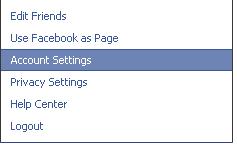
Hello there, Today I will teach how to we can download our FaceBook profile all details including wall posts, photos, videos, links, and all other contents we have added to our profile, now we are going to see how to we can do this, Fist you must log on to your FaceBook account, then you can see top tabs like home, profile, find friends and account tabs, click on the account tab, then select account settings option then you will see account settings page, at this screen you can see download your information option, then you can select learn more link, now you will see next step all information about downloading your account, it is give some warring to us this information contain some sensitive details like our personal details. After reading and understand all of the information you can click on download button, After clicking above button, popup window as confirmation window, click on download button, Now you will notify, as “you will receive email yo...


Comments