Posts

Showing posts with the label Face book privacy settings

how to we can download our facebook acount to our computer
Image
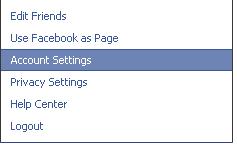
Hello there, Today I will teach how to we can download our  FaceBook  profile all details including wall posts, photos, videos, links, and all other contents we have added to our profile, now we are going to see how to we can do this, Fist you must log on to your  FaceBook  account, then you can see top tabs like home, profile, find friends and account tabs, click on the account tab, then select account settings option then you will see account settings page, at this screen you can see download your information option, then you can select learn more link, now you will see next step all information about downloading your account, it is give some warring to us this information contain some sensitive details like our personal details. After reading and understand all of the information you can click on download button, After clicking above button, popup window as confirmation window, click on download button, Now you will notify, as “you will receive email yo...

Create Fan Page Using Facebook FBML Language

Image
Today I’m going to tell how to we can design pages on facebook using FBML language, LBML Means FaceBook Markup Language.    Today most company web sites and business web sites create their fan page on facebook to promote their products to the world. When we create our fan page on facebook we can use FBML language. Now you can see <-> mark left side of the page, this is our FaceBook FBML page createor language and created pages for out fan page.    Now we are going to see How to create fbml page for our fan page, go to account link then click on use page as face book link, then you can see following screen, then choose your page from the list to add FBML page, Now you must click on edit info page or edit page button top side of the page, then you will see your page settings page like this. On this option choose apps link, then you will see all apes associated with your face book page, then you can add this fbml from the apps store, after added you can see fb...

How to change face book settings?

Image
To change  face book  account settings you must log on to your account, then you can see top tabs like home, profile, find friends and account, then click on account tab and then select account settings option from the drop down list, then you will see account settings page loaded your browser, now you can see main tabs on the account settings page, like this Settings, Networks, Notifications, Mobile, Language, payments, and  face book  ads tabs, we can change these all tabs step by step as your own opinion. Now we are going to see how to we can change this all settings step by step. First step click on the settings tab, and then you can see options as follows Name Username Email Password Linked accounts Privacy Account security Download your information and Deactivate account We can change these all settings, if you want to manage your  face book  linked account you can manage it using linked account option, and if you want to setup  privacy ...

How to Protect our privacy on Face book

Image
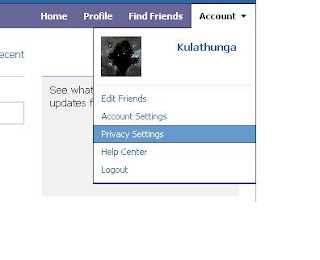
Hello there, Today I’m going to tell how to protect our personality on face book, Toda most of peoples use this face book social network to share them life with their friends, family and other members. Some times we can see some criminal through this social network. We can see some corruption on this social network. Some times we can see our personal data steal through this social network. And our some personal data broadcast world wide without our permission through this site. But we can protect our privacy and personal data on these sites; today we are going to see how to protect our personal data on face book social network. Now we can see how to protect our personality on face book, first log on to your face book account using username and password, then you can see tabs like Home, Profile, Find friends and account, now you    must click on account tab and choose privacy settings option from the drop down list. Then you can see your current face book account privacy s...